You exported a chat to save it, opened the file, and found a strange line where a voice note used to be: <<audiodisplayed>>. No sound, no name, no explanation. The audiodisplayed meaning is simpler than it looks.
Short answer on the audiodisplayed meaning: it’s a text label standing in for an audio message, most often inside an exported chat or a transcript. It isn’t slang. It isn’t a read receipt. And it says nothing about whether anyone listened.
Here’s the thing, though. No messaging app has published an official definition. This guide separates what’s well supported from what’s still a guess, then shows you how to get your voice note back.
Audiodisplayed Meaning in Plain English
Audiodisplayed is a text marker that stands in for an audio or voice message when the audio itself isn’t included, usually in a chat export or transcript. It isn’t slang or an official message status. It tells you an audio item existed at this spot. Nothing more.
Think of it as a “photo goes here” note in a printed report. The text file keeps the order of the conversation but drops the sound. The double angle brackets in <<audiodisplayed>> look like a software marker, not something a person typed.
How sure is the audiodisplayed meaning? Fairly sure about the placeholder idea, because many pages describe it this way and it fits how text files work. Less sure about who writes the label, since no app documentation names it. The sourcing section near the end covers this gap in detail.
Read Also: Slang for Friends: 100+ Popular Terms People Use in 2026
Where You’ll See the Audiodisplayed Meaning in Action
Context decides the audiodisplayed meaning every time. This table shows each place the term turns up, along with how well supported each reading is.
| Where it appears | Likely reading | How well supported |
|---|---|---|
| Exported chat text file | Placeholder for a voice note | Widely repeated, no official documentation |
| Transcription tool output | Label for an audio segment left unconverted | Described by at least one transcription vendor |
| Notification or lock-screen preview | Text standing in for audio | Single-source claim |
| App code or developer logs | Internal status or interface string | Unverified, fits common naming habits |
| Accessibility menus | A different feature, look for “audio description” | Well documented, unrelated |
If the word shows up as a message a friend typed, rather than inside a file or tool, you’re in a separate situation. The slang section below covers it.
Spelling varies too. You’ll see audiodisplayed, audio displayed, and AudioDisplayed. Treat them as the same label until a tool’s own help page says otherwise. The angle brackets tell you more than the capital letters do, because they hint at a machine-written label.
Audiodisplayed Meaning in WhatsApp Exports

WhatsApp is where most people run into this. The Export Chat feature produces a plain text file, with or without media attached. Export guides report voice notes, photos, and stickers get replaced by placeholder lines when media is left out. The usual wording is <Media omitted>, not audiodisplayed.
Read it again. WhatsApp’s own text export, as those guides describe it, doesn’t use the word audiodisplayed. Same job, different label.
So where does audiodisplayed come from? A transcription vendor’s blog presents it as a placeholder tag in exported WhatsApp chats. Other pages repeat the idea, and one of them admits there’s not enough evidence to call it an official WhatsApp status. The likeliest explanation, still unconfirmed, is a tool sitting between WhatsApp and your screen. Think converter, chat viewer, or transcription service.
This points to one useful question. Did the file come straight from WhatsApp, or did it pass through another tool first? The answer settles most cases of audiodisplayed meaning in WhatsApp.
Read More: Hood Slang Meaning: Words, Phrases & Terms Explained
Audiodisplayed Meaning vs. “They Listened to My Voice Note”
The audiodisplayed meaning stops at presence. Displayed means present, and played means heard. Those are different events, and a label in a text file records neither playback nor anything else the other person did.
The label gets created when a file is exported or converted. The sender of the voice note might have played it a second later, or never. The file has no way to know.
WhatsApp does have a separate played status. Meta’s developer documentation says business-sent voice messages receive a “played” status the first time a WhatsApp user plays them, a change dated March 17, 2026. For personal chats, check the playback indicators inside the chat itself, not an exported file.
Seeing the label doesn’t mean you’re being ignored, either. It describes your file, not the other person’s behavior.
Common Mistake: Reading audiodisplayed as a read receipt. The label describes your copy of the chat. It records nothing about what the other person did.
Audiodisplayed Meaning: Slang, Abbreviation, or Neither?

Neither. The audiodisplayed meaning has no hidden slang layer, and nothing in the word is an acronym, since no letters stand for other words. And it isn’t slang the way “ick” or “rizz” is. A search of dictionary sites turned up entries for “audio” and “audio description,” but none for audiodisplayed.
Searches for the phrase also return research papers on “auditory display,” a sound-design field. Hold onto this detail, because the look-alike table below untangles it.
If a friend types the word into a message, ask them. With no documented meaning, any guess about their intent stays a guess. If it appears mid-message from an app or bot, treat it as a system label.
Audiodisplayed Meaning vs. Look-Alike Terms
Several terms sound close to audiodisplayed but do different jobs. This table keeps them apart.
| Term | What it is | Where you meet it |
|---|---|---|
| Audiodisplayed | Placeholder label for audio in a text file | Exports, transcripts |
| <Media omitted> | WhatsApp’s own placeholder when media is left out of a text export | WhatsApp export file |
| Audio description | Spoken narration of what’s visible on screen, built for blind and low-vision viewers | Streaming, cinemas, video players |
| Auditory display | Research term for sharing information through sound, such as earcons and auditory icons | Research papers, interface design |
| Played | Status showing a voice message was heard | Inside messaging apps and business tools |
| Delivered / Read | Status showing a message arrived or was opened | Messaging apps |
The auditory display row explains why a search for “audio displayed” returns academic papers. The phrase has a long history in sound design and shares nothing with chat labels.
Why a Placeholder Replaces Your Voice Note
Text files hold characters. Sound isn’t a character. So any tool turning a chat into text must decide what to put where the audio was, and a marker is the simplest choice.
Three situations lead to this choice:
- The export left media out. WhatsApp offers a without-media option, which produces the standard <Media omitted> lines.
- A converter or viewer dropped the audio. Some tools which turn chats into PDFs or web pages show text only, so sound disappears unless the tool handles attachments.
- A transcription step skipped the segment. One report says some systems insert an explicit label rather than leave a blank when speech-to-text fails on a stretch of audio.
Does the label mean the voice note was deleted? The evidence points the other way. One export guide notes deleted messages aren’t included in the file at all, since they were already removed from the chat. A label suggests the message still existed when the file was made.
The original voice note normally stays in the chat inside the app. Normally, not always. Voice notes live as media files on your phone, so clearing storage to free space deletes them. An export never captures those files anyway.
Read Also: WWA Meaning in Text: What It Stands For and How to Read It
How to Find Every Audiodisplayed Line in a Long Export
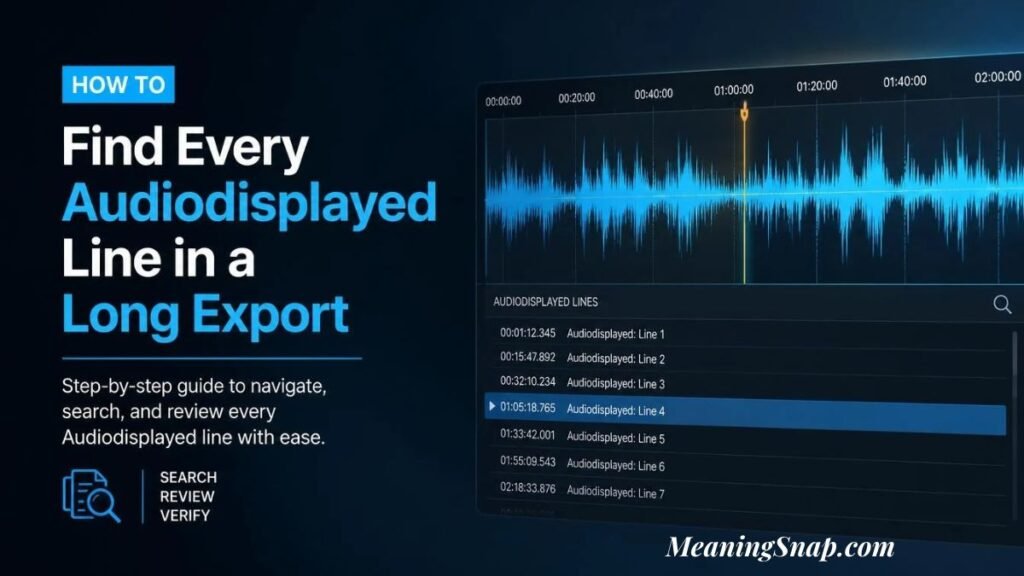
Long chats hide dozens of these. Open the file in any text editor and use Find (Ctrl+F on Windows, Cmd+F on Mac). Type audiodisplayed and look for the match count.
Each label marks one audio item, so the count tells you how many voice notes the file replaced. Most editors ignore capital letters by default, which catches AudioDisplayed too. Jot down the timestamp next to each match. You’ll need those dates and times in the next step.
How to Get Your Voice Message Back
Knowing the audiodisplayed meaning is half the job. Getting the audio is the other half. Work through these steps in order.
- Open the original chat and scroll to the date and time beside the label. The voice note should still be there if nobody deleted it and your phone still holds the file.
- Play it in the app. If the audio won’t play, the local file might be gone, since storage cleanups remove it.
- Re-export with media. On Android, open the chat, tap the three-dot menu, choose More, then Export chat, then Include media. On iPhone, tap the contact or group name, choose Export chat, then pick the option that attaches media. Menu labels shift between app versions. Exports also carry limits, and one guide reports media is included only for roughly the 10,000 most recent messages.
- Switch on voice message transcripts if WhatsApp offers them. Meta’s documentation describes three settings: automatic, manual, and never. With manual, a “Transcribe” prompt appears under the message.
- Try WhatsApp Web on a computer. One guide describes opening the menu on a voice note and choosing Download.
- If a third-party tool built your file, check its settings for an option to include audio or attachments. The label most likely comes from the tool itself.
Sending an Export With Audiodisplayed Lines to Someone Else
Anyone who receives the file sees the same label and hears nothing, so the audiodisplayed meaning travels with it. For records where only the text matters, it’s fine. When the voice notes carry the information, such as plans, directions, or a decision, the file leaves out the important parts.
Two fixes work well. Re-export with media and send the audio files alongside the text. Or write a one-line summary under each label, using the transcripts from the step above.
Audio-displayed Examples in Real Situations
Here are five made-up but realistic scenes showing the audiodisplayed meaning in different tones.
Casual:
Maya: Landing at 6, call me when you’re free Maya: <<audiodisplayed>> Maya: Never mind, saw your text
Two typed lines sandwich a voice note. The export kept the order but lost the sound, so you’d open the original chat at the matching timestamp to hear Maya.
Confused:
“Why does my backup say audiodisplayed where your voice note should be?” “The tool swapped it for a label. Open the real chat and it should still be there.”
The question is sincere, and the reply shows the standard rescue move.
Frustrated:
“I exported forty pages and every voice note turned into audiodisplayed. Useless.”
The fix is a second export with media included, plus transcripts for anything important.
Worried:
“It says audiodisplayed, so he heard it and ignored me.” “The label lives in your file. His phone has nothing to do with it.”
This is the read-receipt mix-up. The label never described the other person.
Sincere:
[00:14:32] Speaker 2: <<audiodisplayed>> [00:14:41] Speaker 1: Right, so we agreed on Friday.
If a transcription tool produced this, it most likely left Speaker 2’s audio unconverted. A short stretch of speech is missing, so don’t rebuild what Speaker 2 said from the text alone.
Quick Check: Work Out the Audiodisplayed Meaning in Your Case
Three questions settle most situations.
Where did you see it? Inside a file or tool points to the placeholder reading in the table above. Typed by a person points to the slang section.
What does the exact text look like? Angle brackets and a clean, machine-style spelling lean toward a system label. Plain words inside a normal sentence lean toward a person typing.
What sits around it? A voice note’s neighbors usually give it away. Look for a message before it saying “listen to this,” or a reply after it responding to something spoken.
What We Checked, and What Nobody Has Confirmed
We looked at four kinds of sources: dictionary results, Meta’s developer documentation for WhatsApp, third-party export guides, and the pages written about this exact term.
Dictionaries had nothing. Meta’s documentation covers voice messages, played status, and transcripts, but never mentions the word. Export guides describe <Media omitted>. Pages about the audiodisplayed meaning mostly agree with each other, though we found only one named vendor behind the documented-tag claim, and one page openly says the evidence for an official status is thin.
Two things stay unconfirmed: which tool first wrote the label, and whether its exact string is the same everywhere. We couldn’t test every export or transcription tool, so treat this guide as a map, not a manual. If you’ve found the label in your own file, the help page of the tool that made it is the final authority.
FAQs
What is the audiodisplayed meaning?
It’s a text label standing in for an audio or voice message, usually inside a chat export or transcript. It marks the spot where audio existed but isn’t included.
Is audiodisplayed slang?
No. It isn’t slang or an acronym, and the dictionary sites we searched have no entry for it.
Does audiodisplayed mean someone listened to my voice message?
No. The label is added when a file is exported or converted, so it records nothing about playback. Check the playback indicator inside the chat instead.
Why does my WhatsApp export say audiodisplayed?
WhatsApp’s own text export, per export guides, uses <Media omitted> for voice notes. Seeing audiodisplayed most likely means another tool touched the file.
How do I recover the voice note behind audiodisplayed?
Often, yes. Open the original chat at the label’s timestamp, or re-export with media included.
Is audiodisplayed an error or a virus?
Nothing we found links it to malware or errors. It’s plain text in a file, so it won’t run anything.
Bottom line on the audiodisplayed meaning
Next time <<audiodisplayed>> appears, ask where the file came from, note the date and time beside the label, and open the original chat to hear the real voice note.

Alex Morgan is a writer focused on explaining slang, words, phrases, acronyms, and popular expressions in a simple and easy-to-understand way. Through clear explanations and helpful examples, Alex helps readers quickly understand what words and phrases mean and how they’re commonly used.